
Sometimes, an interactive timeline infographics can help people to get the information more easily than texts. For example, a timeline can efficiently illustrate historical periods in a class. And you can make your own timeline to organize the events in your life so that it can easily show to your friends, classmates and families.
No matter who you are, if you are finding an interactive timeline maker, I am going to introduce some free or paid, desktop or online timeline maker for you to organize information into a linear structure on your class, documents or presentations.
Here is the short answer before the details. If you want a good-looking timeline image in under fifteen minutes, start from a template in Canva. If you need a data-heavy timeline where the spacing between dates actually means something, use Preceden. If you want a clickable, embeddable timeline that other people can explore, use Time.Graphics or TimelineJS. And if what you really want is a timeline pinned to a map, use Google My Maps or TimelineJS: MyHistro, the tool built for exactly that job, has shut down. Every tool below has a free tier, and every one of them runs in a browser.
One practical point up front: the “desktop timeline maker” category has almost disappeared. Nearly every serious timeline tool is now a web app, and the two desktop programs that survive are paid one-time purchases rather than free downloads. That is good news, because it means your timeline is stored in the cloud, shareable by link, and editable from any computer.
Timeline Makers Compared: Platform, Free Tier and Export Formats
| Tool | Platform | Free tier | Export formats | Best for |
|---|---|---|---|---|
| Time.Graphics | Web | Yes — public timelines, roughly 18 events each, watermarked exports | PDF, JPG, PNG, PPT, XLS, DOC, JSON, XML, TXT, plus ZIP, Google Drive and Dropbox | History classes and long research timelines |
| Preceden | Web (also usable in mobile browsers) | Yes — unlimited timelines, 10 events per timeline, small Preceden logo on exports | PDF, PNG, PPTX, CSV, XLSX, share link, HTML embed | Project plans, roadmaps, legal chronologies |
| MyHistro | Web | No longer available — the domain now hosts a general article site | Formerly Google Earth (KML), PDF and CSV | Nothing in 2026 — see Step 5 for the replacement |
| Canva | Web, Windows, macOS, iOS, Android | Yes — thousands of templates; premium assets are marked with a crown | JPG, PNG, PDF, PDF Print (300 DPI) | Designed, presentation-ready timeline infographics |
| TimelineJS | Web | Yes — free and open source | Interactive HTML embed, driven by a Google Sheet | Media-rich storytelling and journalism |
| Timetoast | Web | Yes — unlimited public timelines, ad-supported | Web page and shareable URL only (no image or PDF export) | Quick homework and revision timelines |
| Tiki-Toki | Web | Yes — limited to one timeline on the free plan | Interactive embed, CSV | Interactive web timelines with video |
| Miro | Web, desktop, mobile | Yes — three editable boards | PNG, PDF, embed | Team workshops and whiteboard roadmaps |
| Timeline Maker Pro | Windows desktop | Trial only; licences from about $49 | PDF, CSV, TAB, TXT, TLM, HTML | Print-ready scheduling charts |
| Aeon Timeline | Windows, macOS | 14-day trial, then a one-time purchase (about $64.99) | CSV, PDF, JPEG, PNG | Novelists, screenwriters and researchers |
Step 1: Decide What Kind of Timeline You Actually Need
Before you sign up for anything, spend thirty seconds deciding which of these four jobs you are doing. The answer picks the tool for you.
- A picture for a slide, poster or handout. You need design control, not data accuracy. Use Canva.
- A working document with real spacing between dates. You need a timeline engine that understands date arithmetic. Use Preceden.
- Something readers can click through on a website. You need an embed code. Use Time.Graphics, TimelineJS or Tiki-Toki.
- A story that happened somewhere, not just sometime. You need a map under the timeline. Use Google My Maps.
Two more practical checks: count your events before you start, because free tiers cap them (Preceden stops at ten events per timeline, Time.Graphics at roughly eighteen), and decide early whether the timeline may be public, because several plans are free precisely for that reason.
Step 2: How to Create A Timeline Online
“Online” used to mean “a website that does less than the desktop program”. In 2026 it means the opposite: the browser version is the product. You create an account, name the timeline, add events with a date and optionally an end date, arrange them in layers, then share or export. Nothing is installed, and your work is saved on the service’s servers.
The workflow is the same almost everywhere:
- Create a free account — most tools do not ask for a credit card.
- Set the date range, then add events one by one or import them from a spreadsheet.
- Group related events into layers so the chart stays readable.
- Export for where the timeline will live: PDF for print, PNG or JPG for slides, an embed code for a website.
The sections below walk through that same workflow in the individual tools, starting with the ones that fit the most common jobs.
Step 3: TimeGraphics – Free Online Timeline Maker
TimeGraphics is a free online Timeline Maker. You can easily demonstrate any processes of the world’s or your country history so that . people can understand the development of a civilization or a state quickly. You can easily organize your events of your life so that people can fast know what is happening to you. After the timeline have done by TimeGraphics, you can export your timeline to Google Drive, Dropbox and download to computer for offline viewing. In addition, you can download and save your timeline files as a PDF, JPG, PNG, PPT, Excel, Doc, JSON, XML and TXT file.

Time.Graphics runs at time.graphics and keeps a public library of more than 500,000 community timelines. The free account gives you public timelines of roughly eighteen events and a handful of media files each, and exports carry a watermark; private timelines, watermark-free export and high-resolution posters are premium. The price list is unusual — the official pricing page quotes $4.90 for two days, $18.90 for one month and $97.90 for one year, with students at about $3 per year and teacher seats starting near $100 per year and falling toward $20 in bulk. Alongside PDF, JPG, PNG, PPT, Excel, Doc, JSON, XML and TXT, the site also offers complete offline export as a ZIP to Google Drive, Dropbox or your device, plus Google Calendar, Sheets, Maps and YouTube imports, real-time collaboration, and an AI timeline generator that any new account can try.
Step 4: Preceden – Simple Timeline Maker
Preceden is another online Timeline Maker. It provides you great features to create an edit a timeline with an easy-to-use Interface. Preceden uses multiple layers to help you group related events together. By grouping related events together in layers, it makes the timeline look clean and organized.
In the end, you can save, download, embed and share your timelines. You can download your timeline as a printable PDF files, CSV files, JPG and PNG. You can share it to your friends, family and colleagues via URL. You can also embed the timeline into your website.

Preceden is one of the cleanest timeline makers on the web, and layers are its signature feature: layers, dependencies, milestones, percent-complete bars and connecting lines are all built in. The free plan allows unlimited timelines but caps each at ten events, and exports on the free plan carry a small Preceden logo. Timelines download as PDF, PNG, PowerPoint (PPTX), CSV and Excel (XLSX), and you can share by URL, embed as HTML or present full screen. Privacy options include private, password-protected and secret-URL timelines. Paid plans are Basic at $10 per month billed annually ($25 monthly) and Pro at $16 per month billed annually ($40 monthly), with Pro adding spreadsheet import, collaborators, a custom logo and a custom domain. There is also a free AI timeline generator that drafts a timeline without an account. There is no desktop version — phones handle basic edits, but the full editor wants a tablet or laptop screen.
Step 5: MyHistro – Free Map Timeline Combiner
As you want to make a timeline in a map, the tool built for exactly that job was MyHistro , which combined maps and timelines seamlessly into documents, presentations or images and exported timeline files as Google Earth (KML) format for offline viewing. MyHistro has shut down: the myhistro.com domain now serves a general-interest article site with no timeline editor, no story creator and no KML export, so there is nothing left to sign up for.
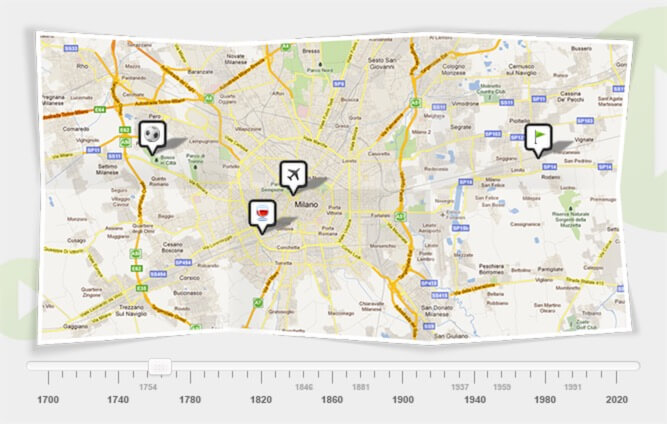
Use one of these instead:
- Google My Maps — free and browser-based. Drop dated pins on a map, draw lines and regions, and export KML or KMZ that opens in Google Earth offline. The closest direct replacement.
- TimelineJS — free and open source from Knight Lab. Not map-first, but it accepts a location per event and renders maps inside an embeddable timeline driven by a Google Sheet.
- StoryMapJS — the same lab’s map-first tool, if you want a guided tour of places rather than a strict chronology.
Whichever you choose, keep the offline-viewing habit: export a KML or PDF copy to your own drive, because free web tools disappear.
Step 6: What’s More – Start From a Timeline Template
If you want to make a timeline quickly, you can find some timeline templates to create a wonderful timeline pictures so that it can save your time to consider how to make your own timeline step by step. You just need to replace the texts of the template and export it out. Canva is a great online design website, which provides online Photo Editor, Graphs and Picture Templates (including Timeline Templates ), you can get a suitable one here and fast make your own timeline images.
Starting from a template is the fastest route to a finished timeline, and Canva has the biggest library of them — search for “timeline” or “timeline infographics” and filter by free, since premium templates carry a crown badge. Canva exports JPG, PNG and PDF, with PDF Print when you need 300 DPI for a handout, and it runs on Windows, macOS, iOS and Android as well as in the browser. It will also embed a timeline on a blog, but the result is a static graphic that does not recalculate spacing when your dates change, so avoid it for a live project plan. Canva Pro adds brand kits, background removal and the full premium asset library, which most one-off timelines do not need. Use a horizontal layout for ten events or fewer and a vertical one for more, and duplicate an existing event group instead of rebuilding icons and connector lines each time.
Which Timeline Maker Should You Pick?
| If your situation is… | Pick | Because |
|---|---|---|
| You need a slide-ready image tonight | Canva | Thousands of free templates, export to PNG, JPG or PDF in minutes |
| You are planning a project with real deadlines | Preceden | Layers, dependencies, milestones, and exports to PPTX, PDF, CSV and XLSX |
| You are teaching or studying history | Time.Graphics | Built for education, handles BC dates and very long spans, AI first draft |
| You want something readers can click through | TimelineJS or Tiki-Toki | Interactive embeds that work on any website |
| The events happened in places, not just on dates | Google My Maps | Free, and exports KML/KMZ you can open in Google Earth |
| Your whole team needs to edit at once | Miro | Real-time collaboration on a shared board |
| You work offline or need print-shop quality | Timeline Maker Pro or Aeon Timeline | Desktop software with print-focused output |
| You only have twenty minutes and no design sense | Timetoast | Type the events, get a link, done |
Oftaj Demandoj
1. What is the best free timeline maker in 2026?
There is no single winner, because the answer depends on the output. For a designed image, Canva. For a date-accurate project or legal timeline, Preceden. For an interactive embed, TimelineJS or Time.Graphics. All four have usable free tiers, so none of them needs paying for on day one.
2. Is MyHistro still available?
No. MyHistro has shut down, and the myhistro.com domain now hosts unrelated articles. Use Google My Maps for a mapped timeline, or TimelineJS for an embeddable one with location fields.
3. How many events can I add before I have to pay?
Preceden allows unlimited timelines but ten events per timeline on the free plan. Time.Graphics keeps free timelines public and roughly eighteen events long. Canva and TimelineJS do not cap events at all — Canva restricts premium assets instead, and TimelineJS is entirely free.
4. Can I embed a timeline in my website or blog?
Yes. Preceden gives you an HTML embed code, Time.Graphics and Tiki-Toki publish embeddable interactive timelines, TimelineJS embeds from a Google Sheet, and Canva offers an embed for a finished design. Timetoast is the exception: free timelines live on its own domain.
5. Which export format should I use?
PDF for print, PNG for slides where sharp text matters, JPG for web pages where file size matters, and PPTX or XLSX when the timeline must be edited further in PowerPoint or Excel. Printing a Canva design? Choose PDF Print for 300 DPI instead of the default 96 DPI.
6. Do I need to install any software?
Almost never. Every browser tool in the table above runs without installation, and Preceden has no desktop version. Only Timeline Maker Pro and Aeon Timeline require an install, and both are paid.
Konkludo
A timeline is still one of the simplest ways to make a stretch of time understandable, whether you are illustrating historical periods for a class, laying out the events of your own life, or keeping a project team honest about deadlines. The good news in 2026 is that you no longer have to choose between a free tool that does too little and a desktop program that costs too much: browser-based timeline makers now cover almost every use case, and each has a free tier generous enough to finish real work.
Pick by output rather than by feature list. For a picture, start from a Canva template and export a PNG or print-quality PDF. For accuracy across dates, build it in Preceden and export to PDF, PPTX or XLSX. For something readers can click and explore, embed a Time.Graphics or TimelineJS timeline. If the story happened somewhere as well as sometime, Google My Maps covers the map-timeline job, including the KML file you can open offline in Google Earth.
Two cautions close the loop. First, check the free-tier limits before you invest an evening in a tool — ten events per timeline is a hard wall, and so is a public-only privacy setting. Second, always export a copy to your own Google Drive or Dropbox when you finish. Web tools change, shut down or get repurposed, and the offline PDF, PNG or KML on your own drive is the version you can still open years later.
Kiom utila estis ĉi tiu afiŝo?
Alklaku stelon por taksi ĝin!
Meza rangigo / 5. Voĉkalkulo: